
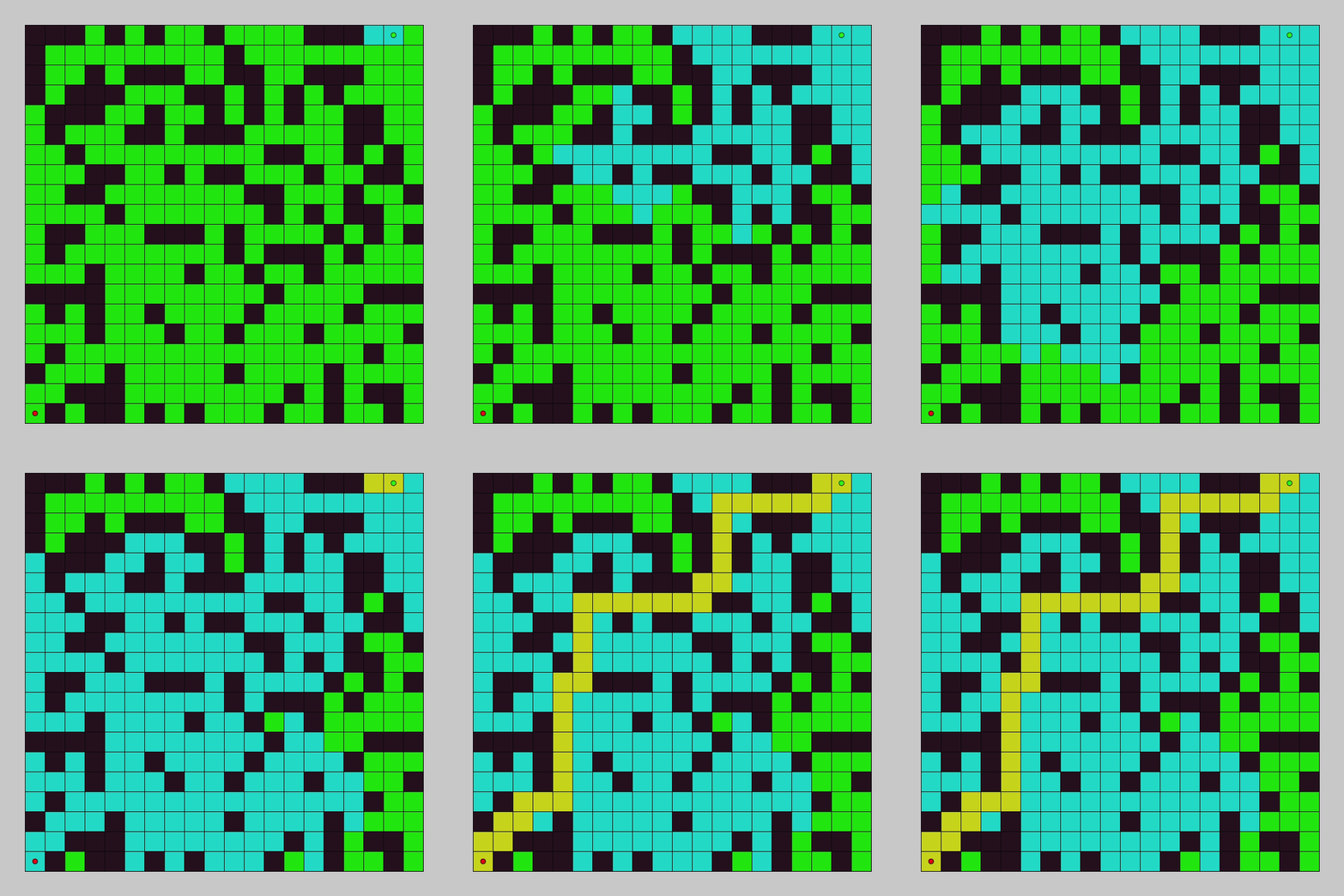
Learn how to explore a grid and find a goal point with breadth first search in this pathfinding tutorial. You will use Processing and Java to code the breadth first search pathfinding algorithm and create a graphical demo so you can see it in action.
Introduction
In the last tutorial, we programmed depth first search and watched it explore a node graph. In this tutorial we will program breadth first search and watch it explore a grid.
The breadth first search algorithm will add every unexplored adjacent node to a queue, and explore all of the added nodes in sequence. For each node explored, it will continue to add the adjacent unexplored nodes to the queue. It will continue to do this until the goal is found or all connected nodes have been explored.
Open Processing
Open Processing, then add these imports to the main tab.
The “ArrayDeque” will be used as a queue, where we add elements to the back of the container, and remove elements from the front of the container.
import java.util.ArrayDeque;
This import will be used to reverse the path list we create earlier, since we will find the path from the goal point, and work our way back to the start point.
import java.util.Collections;
Next we will define the number of columns and rows for the grid.
final int columns = 20;
final int rows = 20;
Then we will define the grid cell size and create another variable for half of the grid cell size.
final int cellSize = 32;
final float halfCellSize = cellSize / 2;
Next we will create an array list of nodes, which will store all the nodes in the grid.
final ArrayList<Node> nodeList = new ArrayList<Node>(columns*rows);
Don’t worry about any warnings or errors, we will create the “Node” class later.
Now we will create an array list to store the explored nodes. This will be used by the graphical demo later.
ArrayList<Node> exploredNodes = new ArrayList<Node>();
int currentExploredSize = 0;
Next we will define an array list for the path taken by the algorithm from the start point to the goal point.
ArrayList<Node> path = new ArrayList<Node>();
int currentPathSize = 0;
Then we will create a variable which we will use as a timer, to control the animation speed of the graphical demo.
int startTime = 0;
Finally we need to create two variables which will store the start and goal nodes.
Node start = null;
Node goal = null;
Node
Create a new tab called “Node”.
Then create a class called “Node”, inside the “Node” tab.
class Node
{
  PVector position = new PVector();
  ArrayList<Node> adjacentNodes = new ArrayList<Node>();
  boolean isWall = false;
  boolean explored = false;
  Node parent = null;
}
The node class has a position variable, which will be used as the node’s grid cell position. This position will be the centre of the node.
We also have an array list of adjacent nodes, which stores the node’s neighbouring connected nodes on the grid.
The next variable is a boolean which determines whether the node is a wall or not. Walls will not have any neighbouring grid cells, and so no connections.
The explored boolean is used to determine which nodes have been explored.
Finally the parent variable stores the previous node which accessed this node.
Create Nodes
Next we will create all the nodes in our grid.
Add this function inside the “Node” tab.
void CreateNodes()
{
  PVector translate = new PVector();
  translate.x = width / 2 - (columns * cellSize) / 2;
  translate.y = height / 2 - (rows * cellSize) / 2;
  for(int y=0; y<rows; ++y)
  {
    for(int x=0; x<columns; ++x)
    {
      Node node = new Node();
      nodeList.add(node);
      node.position.set(x * cellSize, y * cellSize);
      node.position.add(halfCellSize, halfCellSize);
      node.position.add(translate);
    }
  }
}
We first create a variable called “translate”, which is used to translate the nodes to the centre of the screen. This is purely for visual purposes.
We then create all the nodes in the grid using the row and column values we declared earlier.
Create Walls
Next we will create a new function which creates the walls, inside the “Node” tab.
void CreateWalls()
{
  randomSeed(1);
  final int total = columns*rows-1;
  for(int i=0; i<150; ++i)
  {
    nodeList.get((int)random(0, total)).isWall = true;
  }

  start = nodeList.get(18);
  goal = nodeList.get(columns*rows-20);
}
Using a random seed value and by selecting random grid cells, we can turn random nodes into walls.
We can then pick a start and goal node we like.
Connect Nodes
Next we will connect our nodes together. Inside the “Node” tab create a new function.
void ConnectNodes()
{
  // Adjacent - 4 nodes
  final float squaredRadius = cellSize*cellSize*2;
  float magSquared = 0;
  PVector delta = new PVector();
  for(Node a : nodeList)
  {
    if(a.isWall) continue;
    for(Node b : nodeList)
    {
      if(a == b || b.isWall) continue;
      delta.set(a.position);
      delta.sub(b.position);
      magSquared = delta.magSq();
      if (magSquared < squaredRadius)
      {
        a.adjacentNodes.add(b);
      }
    }
  }
}
We will loop through all the nodes, and only connect adjacent nodes which aren’t walls using the squared distance value between the nodes. We use the squared distance value since it is more efficient, and avoids using a costly square root.
The four adjacent nodes are north, east, south and west on the grid.
If we want the diagonal grid cells, then we could use this squared radius value instead.
  // Adjacent + Diagonal - 8 nodes
  final float squaredRadius = cellSize*cellSize*4;
Breadth First Search
Now we will code the breadth first search algorithm. Create a new tab called “Pathfinding”. Then create a new function inside this new tab.
The new function will take a start node, goal node, and a list which will store the path taken by the algorithm.
boolean BreadthFirstSearch(Node start, Node goal, ArrayList<Node> path)
{
}
The first thing we will do in the new function is clear the path and explored node lists. Then create a variable which will store the number of moves taken.
  path.clear();
  exploredNodes.clear();
  int moves = 0;
Then we will check if the start node is the goal node. If this is true, then we have already found the goal. So we add the start node to the path and return true.
  if(start == goal)
  {
    println("Goal is start node");
    path.add(start);
    return true;
  }
Next we will create a deque. A deque is a doubled-ended queue. Which means we can add elements to it efficiently at either end. But we will be using it as a regular queue for the algorithm.
ArrayDeque<Node> deque = new ArrayDeque<Node>();
First we add the start node to the tail of the deque. Then we mark the start node as explored.
  deque.add(start);
  start.explored = true;
Then we will create a node variable which will store the current node.
Node current = null;
Next create a while loop. This loop will run until the deque is empty.
  while(!deque.isEmpty())
  {
  }
Inside the while loop we will increment the number of moves taken.
++moves;
Then we will obtain and remove the current node from the front of the deque.
current = deque.pop();
Next we will add the current node to the list of explored nodes.
exploredNodes.add(current);
Now we will create a for loop. The for loop will iterate over all the adjacent nodes of the current node.
    for(Node node : current.adjacentNodes)
    {
    }
Inside the for loop we will continue if the node is explored.
if(node.explored) continue;
Else we will mark the node as explored, and set the parent to the current node.
      node.explored = true;
      node.parent = current;
Then we will add the node to the deque.
deque.add(node);
Next we will check if the node is the goal node.
      if(node == goal)
      {
      }
Inside the if statement, we first add the node to the explored node list, and print how many moves have been taken to the console.
        exploredNodes.add(node);
        println("Goal has been found in " + moves + " moves");
Then we will set the current node, to the node. While the current node isn’t null, then we will add the current node to the path, and set the current node to it’s parent. We do this until we backtrack all the way back to the start node. Remember the start node doesn’t have a parent node.
        current = node;
        while(current != null)
        {
          path.add(current);
          current = current.parent;
        }
Next we will reverse the collection, so it goes from the start to the goal. Then return true, since we have found the goal and created the path.
        Collections.reverse(path);
        return true;
Finally outside of the while loop which checks if the deque is empty, and at the end of the function. We just need to print the number of moves taken and return false. Since we didn’t find the goal point.
  println("Failed to find the goal in", moves, "moves");
  return false;
Full algorithm code:
boolean BreadthFirstSearch(Node start, Node goal, ArrayList<Node> path)
{
  path.clear();
  exploredNodes.clear();
  int moves = 0;

  if(start == goal)
  {
    println("Goal is start node");
    path.add(start);
    return true;
  }

  ArrayDeque<Node> deque = new ArrayDeque<Node>();
  deque.add(start);
  start.explored = true;
  Node current = null;
  while(!deque.isEmpty())
  {
    ++moves;
    current = deque.pop();
    exploredNodes.add(current);
    for(Node node : current.adjacentNodes)
    {
      if(node.explored) continue;
      node.explored = true;
      node.parent = current;
      deque.add(node);
      if(node == goal)
      {
        exploredNodes.add(node);
        println("Goal has been found in " + moves + " moves");
        current = node;
        while(current != null)
        {
          path.add(current);
          current = current.parent;
        }
        Collections.reverse(path);
        return true;
      }
    }
  }

  println("Failed to find the goal in", moves, "moves");
  return false;
}
Setup
It’s time to use our algorithm and create our grid.
Back in the main tab, create a setup function.
void setup()
{
  size(720, 720);

  CreateNodes();
  CreateWalls();
  ConnectNodes();

  BreadthFirstSearch(start, goal, path);

  startTime = millis();
}
We first set the window size, then create the grid of nodes, then the walls, then we connect the nodes. Next we run the breadth first search algorithm. Then finally we set the start time to the number of milliseconds taken since the start of the program. We will use this later for timekeeping.
Rendering
It’s now time to create the rendering code, so we can see the algorithm in action!
First create a function which renders all the grid cells as rectangles.
void RenderGrid()
{
  stroke(10);
  for(Node node : nodeList)
  {
    if(node.isWall)
      fill(40, 20, 30);
    else
      fill(20, 200, 10);
    rect(node.position.x - halfCellSize, node.position.y - halfCellSize, cellSize, cellSize);
  }
}
Then create a function which renders the path taken. Every 25 milliseconds we increment the explored node index. If the explored node index has reached the maximum, then we will increment the path index. Since we want to show the explored nodes first, then the path nodes.
Then we draw the explored nodes as rectangles, and finally the path nodes as rectangles.
void RenderPath()
{
  // Control size of path
  if(millis() - startTime > 25)
  {
    startTime = millis();

    if(currentExploredSize == exploredNodes.size())
    {
      currentPathSize = min(++currentPathSize, path.size());
    }

    currentExploredSize = min(++currentExploredSize, exploredNodes.size());
  }

  // Draw the explored nodes
  stroke(10);
  fill(20, 200, 200);
  Node node = null;
  for(int i=0; i<currentExploredSize; ++i)
  {
    node = exploredNodes.get(i);
    rect(node.position.x - halfCellSize, node.position.y - halfCellSize, cellSize, cellSize);
  }

  // Draw the path taken
  stroke(10);
  fill(200, 200, 20);
  for(int i=0; i<currentPathSize; ++i)
  {
    node = path.get(i);
    rect(node.position.x - halfCellSize, node.position.y - halfCellSize, cellSize, cellSize);
  }
}
Next create a function which renders the start and goal nodes as circles.
void RenderStartAndGoal()
{
  // Draw start and goal nodes as circles
  stroke(10);
  fill(20, 255, 10);
  final float radius = cellSize / 4;
  circle(start.position.x, start.position.y, radius);
  fill(255, 10, 20);
  circle(goal.position.x, goal.position.y, radius);
}
Finally we just need a draw function. First we clear the screen to a background colour. Then call the three render functions we made earlier.
void draw()
{
  background(200);
  RenderGrid();
  RenderPath();
  RenderStartAndGoal();
}
Keyboard
Add this code to restart the animation using the “R” key.
void keyPressed()
{
  if(key == 'r' || key == 'R')
  {
    currentExploredSize = 0;
    currentPathSize = 0;
    startTime = millis();
  }
}
Finally you just need to run the sketch, and you should see a cool graphical demo of the pathfinding in action!
Exploring All Nodes
If you want to see the breadth first search algorithm explore every connected node in the grid. Then remove the check which exits after finding the goal in the breadth first search function.
if(node == goal)
{
}

Conclusion
Thanks for reading this tutorial. You have learned how to construct a grid, create walls, connect nodes and code the breadth first search pathfinding algorithm. You then coded a graphical demo, so you can see the pathfinding in action.
 Agate DRAGON Games