

Learn how to code the object pool pattern by managing a pool of books in a library. Borrow and return books to the pool in this console application tutorial using C++ and Visual Studio.
Introduction
In the last tutorial you learned how to code a pool of bullets.
In this tutorial you will learn how to manage a pool of books. The tutorial is written in the C++ programming language and uses the Visual Studio development environment.
To follow along to this tutorial, you can either just read it and apply the knowledge to your programming language. Or you can use Visual Studio, by creating a solution, then create a project with a console application. Then run the project to see the output in the console window.
Includes
First include these headers.
#include <algorithm>
#include <iostream>
#include <memory>
#include <string>
#include <vector>
Print line
Next we will create a function which prints a string to the console.
static void PrintLine(const std::string& message)
{
    std::cout << message << std::endl;
}
Book class
Now we need to create a book class. We will store the books in a pool later.
class Book
{
private:
    std::string mTitle = "NO_TITLE_SET";

public:
    void Reset()
    {
        // Reset the variables to defaults
        mTitle = "NO_TITLE_SET";
    }

    void SetTitle(const std::string& title)
    {
        mTitle = title;
    }

    void PrintTitle() const
    {
        PrintLine(mTitle);
    }
};
The book class is relatively simple. It has one data member called ‘mTitle’ which represents the book title.
The ‘Reset’ function is called later on by the book pool, to reset the variables of the book class.
The ‘SetTitle’ function sets the title of the book.
Finally the ‘PrintTitle’ function prints the title of the book.
BookPool
Now we will code the ‘BookPool’ class, which will store a pool of books. The ‘BookPool’ stores the books in a ‘std::vector’. Notice that each book is a ‘shared_ptr’. This is so if a book is lost, its memory can still be cleaned up and we don’t get any memory leaks.
class BookPool
{
private:
    std::vector<std::shared_ptr<Book>> mBookList;

public:
    BookPool(unsigned number)
    {
        // code goes here
    }

    std::shared_ptr<Book> Get()
    {
        // code goes here
    }

    void Return(std::shared_ptr<Book> book)
    {
       // code goes here
    }
};
The ‘BookPool’ has a constructor and two functions.
In the constructor we will create some books and add them to the book list based on the number passed in. Finally we print some messages to the console.
    BookPool(unsigned number)
    {
        for (unsigned i = 0; i < number; ++i)
            mBookList.push_back(std::make_shared<Book>());

        PrintLine("Constructing BookPool");
        PrintLine("BookPool size is: " + std::to_string(mBookList.size()));
    }
The ‘Get’ function is used to borrow a book. We first check if there are any books. If there are no books, then we have to create a new one.
If there is at least one book, then we will retrieve the last book in the list, reset its variables, remove it from the list and return it.
    std::shared_ptr<Book> Get()
    {
        // If there are no books available, create a new one
        if (mBookList.empty())
        {
            PrintLine("Warning: Pool is empty, creating a new book");
            return std::make_shared<Book>();
        }

        // Get an existing book
        std::shared_ptr<Book> book = mBookList.back();
        // Remember to reset it
        book->Reset();
        // And remove it from the pool
        mBookList.pop_back();
        return book;
    }
Finally the ‘Return’ function is used to return a book to the list. We first check if the book is already in the list, since we don’t want to store duplicates.
    void Return(std::shared_ptr<Book> book)
    {
        // No duplicates allowed!
        std::vector<std::shared_ptr<Book>>::iterator it = std::find(mBookList.begin(), mBookList.end(), book);
        if (it == mBookList.end())
        {
            PrintLine("Book successfully returned");
            mBookList.push_back(book);
        }
    }
Main function
Finally we just need to code our main function.
int main()
{
    // Create a BookPool
    BookPool bookPool(2);

    PrintLine("Welcome to the library! Are you here to borrow some books?");
    PrintLine("Borrow a book");
    std::shared_ptr<Book> book = bookPool.Get();
    PrintLine("Set the book title");
    book->SetTitle("The Hitchhiker's Guide to the Galaxy");
    book->PrintTitle();

    PrintLine("And remember to return it!");
    bookPool.Return(book);

    // Causes a memory leak when using dynamic memory without using a smart pointer
    PrintLine("Retrieve three books");
    bookPool.Get();
    bookPool.Get();
    // Pool is empty at this point
    bookPool.Get();

    PrintLine("You failed to return the books, and the librarian hunted you down. The end!");
}
We first create the ‘BookPool’.
    // Create a BookPool
    BookPool bookPool(2);
We then get a book, set the title and print the title.
    PrintLine("Welcome to the library! Are you here to borrow some books?");
    PrintLine("Borrow a book");
    std::shared_ptr<Book> book = bookPool.Get();
    PrintLine("Set the book title");
    book->SetTitle("The Hitchhiker's Guide to the Galaxy");
    book->PrintTitle();
Now we can return our book to the pool, so it can be reused.
    PrintLine("And remember to return it!");
    bookPool.Return(book);
Next we retrieve three books. The pool only has two books stored. So we need to create a third book during the third ‘Get’ call.
    // Causes a memory leak when using dynamic memory without using a smart pointer
    PrintLine("Retrieve three books");
    bookPool.Get();
    bookPool.Get();
    // Pool is empty at this point
    bookPool.Get();
We are also not storing the books, so there memory will get cleaned up and we won’t be able to return them to the pool. Luckily we are using shared pointers here, otherwise we might have a memory leak on our hands!
Finally we finish with a funny joke…
PrintLine("You failed to return the books, and the librarian hunted you down. The end!");
But seriously, make sure you return your books to the library, and objects to the pool!
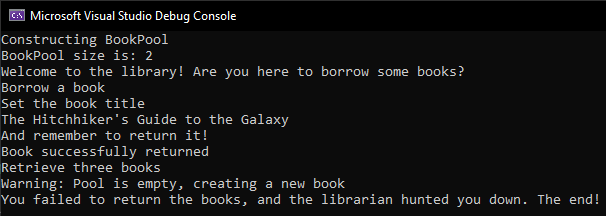
Console output
If you run this program in Visual Studio with a console application, then you should see this:
Conclusion
Thanks for following this tutorial, see you in the next one!
 Agate DRAGON Games