

Learn how to code the observer pattern using the C++ programming language in Visual Studio, and expand your knowledge of this software design pattern.
Introduction
The observer pattern has an object named the ‘subject’ which maintains a list of ‘observers’. The subject will notify all the observers when an event occurs. The observers can then choose how they wish to respond to the event.
In this tutorial you will code a zookeeper and animals. The zookeeper represents the subject of the observer pattern. Whilst the animals represent the observers.
The zookeeper will notify the animals when he arrives, and the animals will respond in there own unique way.
To follow along to this tutorial, you can either just read it and apply the knowledge to your programming language. Or you can use Visual Studio, by creating a solution, then create a project with a console application. Then run the project to see the output in the console window.
Include
First include these headers, since we will need them later.
#include <algorithm>
#include <iostream>
#include <vector>
Observer interface
We will start by coding the interface class for the observer.
class Observer
{
public:
    virtual void Update() = 0;
};
The observer class has only one pure virtual function, which has to be implemented by any children inheriting from it. This ‘Update’ function will be called by the subject later when an event occurs.
Observer children
We will create two classes which implement the ‘Observer’ interface, and override the pure virtual ‘Update’ function.
class Cat : public Observer
{
    void Update() override
    {
        std::cout << "The cat purrs happily!" << std::endl;
    }
};

class Rabbit : public Observer
{
    void Update() override
    {
        std::cout << "The rabbit hops happily!" << std::endl;
    }
};
The ‘Cat’ and ‘Rabbit’ classes both print a unique message when the ‘Update’ function is called.
Subject
Next we will code the ‘Subject’ class. The subject will be called ‘Zookeeper’. Since the zookeeper will notify the animals when he has arrived to feed them. The animals will then react to the notification with a unique message.
class Zookeeper
{
private:
    std::vector<Observer*> mObservers;

public:
    void Add(Observer* observer)
    {
        // No duplicates allowed!
        std::vector<Observer*>::iterator it = std::find(mObservers.begin(), mObservers.end(), observer);
        if (it == mObservers.end())
        {
            mObservers.push_back(observer);
        }
    }

    void Remove(Observer* observer)
    {
        std::vector<Observer*>::iterator it = std::find(mObservers.begin(), mObservers.end(), observer);
        if (it != mObservers.end())
        {
            mObservers.erase(it);
        }
    }

    void Notify()
    {
        std::cout << "Notify " << mObservers.size() << " animals" << std::endl;
        for (Observer* o : mObservers)
        {
            o->Update();
        }
    }
};
The zookeeper class manages a vector of observers.
std::vector<Observer*> mObservers;
The zookeeper class has three public functions:
- Add
- Remove
- Notify
The ‘Add’ function adds an observer to the vector, and the ‘Remove’ function removes an observer from the vector.
Finally the ‘Notify’ function calls the ‘Update’ function of all the observers stored in the vector.
Main function
Now we will create a main function, so we can use our animal and zookeeper classes.
int main()
{
    Cat cat;
    Rabbit rabbit;

    Zookeeper zookeeper;
    zookeeper.Add(&cat);
    zookeeper.Add(&rabbit);
    zookeeper.Notify();

    std::cout << std::endl << "Removing rabbit" << std::endl;
    zookeeper.Remove(&rabbit);
    zookeeper.Notify();

    std::cout << std::endl << "Removing cat" << std::endl;
    zookeeper.Remove(&cat);
    zookeeper.Notify();

    std::cout << std::endl << "Program exiting" << std::endl;
}
We first create a cat and a rabbit inside of the main function.
    Cat cat;
    Rabbit rabbit;
Next we create a zookeeper instance. Then add the cat and the rabbit to the zookeeper’s vector. Finally we call ‘Notify’, which will print the animal messages to the console.
    Zookeeper zookeeper;
    zookeeper.Add(&cat);
    zookeeper.Add(&rabbit);
    zookeeper.Notify();
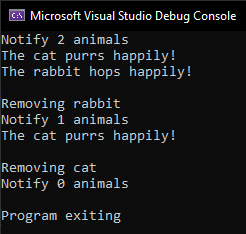
Next we will remove the rabbit, then call ‘Notify’. This time only the cat message will print.
    std::cout << std::endl << "Removing rabbit" << std::endl;
    zookeeper.Remove(&rabbit);
    zookeeper.Notify();
Finally we will remove the cat, and this time no message will be printed after ‘Notify’ is called.
    std::cout << std::endl << "Removing cat" << std::endl;
    zookeeper.Remove(&cat);
    zookeeper.Notify();
Output
If you run this program in Visual Studio with a console application, then you should see this:
Conclusion
Congratulations on completing this tutorial! You have learned how to use the observer pattern with this simple zookeeper and animal example. Thanks for reading this tutorial, see you in the next one!
Read the next tutorial to see the observer pattern in action in a graphical demo.
 Agate DRAGON Games