
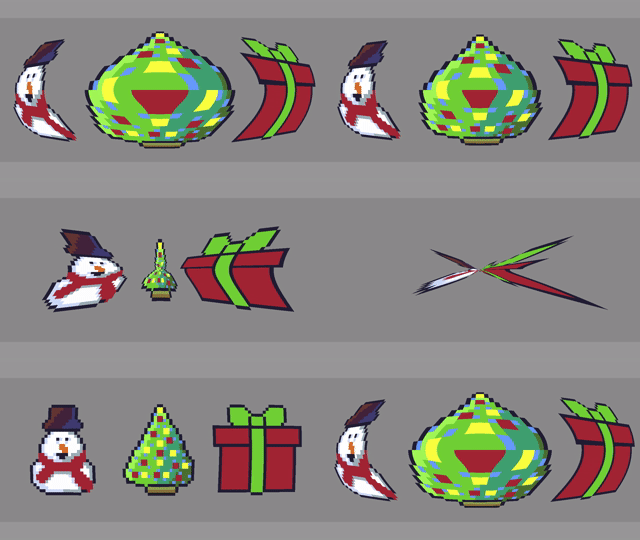
This tutorial will show you how to create a barrel distortion effect in a fragment shader. It can also be used to create a pincushion distortion effect.
See here for a more detailed explanation of barrel distortion.
Distortion (optics) – Wikipedia
Original Christmas sprite without an effect applied.

Christmas sprite with barrel distortion applied.
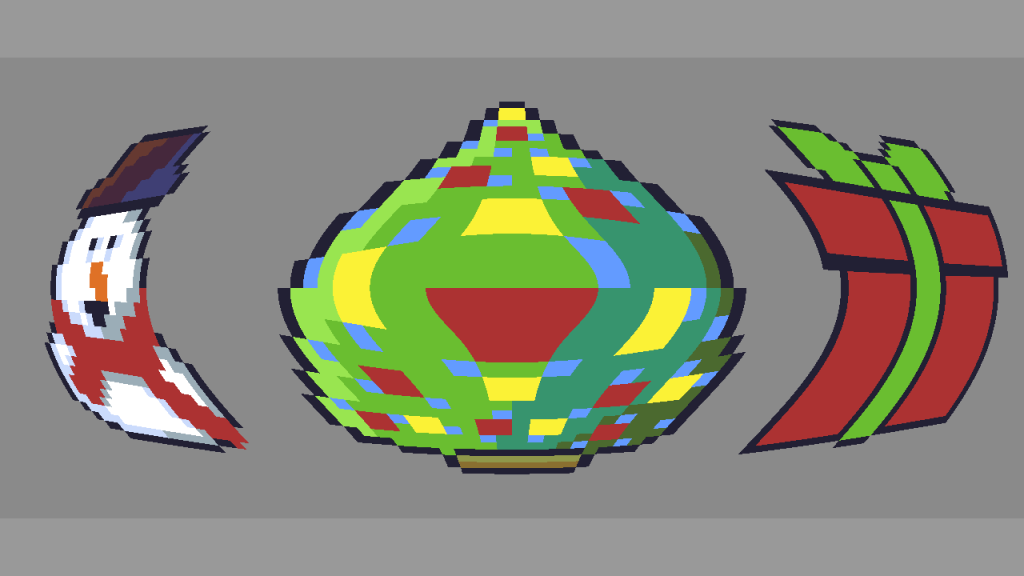
Pincushion distortion applied.

GIF of the barrel distortion effect being applied to the Christmas sprite with the power being changed over time.

GLSL shader code
#version 330 core

// The power of the barrel distortion
uniform float power = 2.2f;

// Texture Unit
uniform sampler2D textureUnit;

// Texture coordinate
in vec2 texCoord;

// Final colour
out vec4 fragColour;

vec2 BarrelDistortionCoordinates(vec2 uv)
{
	// Convert tex coord to the -1 to 1 range
	vec2 pos = 2.0f * uv - 1.0f;

	float len = length(pos);
	len = pow(len, power);

	pos = normalize(pos);
	pos *= len;

	// Convert pos to the 0 to 1 range
	pos = 0.5f * (pos + 1.0f);

	return pos;
}

void main()
{
	vec2 barrelUV = BarrelDistortionCoordinates(texCoord);
	fragColour = texture(textureUnit, barrelUV);
}
The power of the barrel distortion can be changed using this uniform.
uniform float power = 2.2f;The barrel distortion is achieved by firstly converting the texture coordinates from the 0 to 1 range, to the -1 to 1 range.
vec2 pos = 2.0f * uv - 1.0f;We then get the length of the newly transformed coordinates, and raise it to the power of the power uniform.
float len = length(pos);
len = pow(len, power);
Next we normalise the position variable and scale it by the new length. If the new length is greater than the original length, then we get barrel distortion. If the new length is smaller than the original length, then we get pincushion distortion.
pos = normalize(pos);
pos *= len;
Convert back to the 0 to 1 range.
pos = 0.5f * (pos + 1.0f);Finally we just need to use our new barrel coordinates in the texture function.
vec2 barrelUV = BarrelDistortionCoordinates(texCoord);
	fragColour = texture(textureUnit, barrelUV);
Animating the power uniform in C++.
	float s = std::sin(timeSeconds);
	// Convert to the 0 to 1 range
	s = s * 0.5f + 0.5f;
	s *= 2.2f;
	// Ensure the minimum number is greater than 0
	s += 0.1f;
	shader->Uniform1f("power", s);
Thank you for reading this tutorial, I hope you found it useful!
 Agate DRAGON Games
2 responses to “Barrel Distortion Shader”
This is a pretty straight forward and easy to understand implementation of a barrel distortion every other way I have seen is very convoluted.
I would like to adapt this for a game I am working on but I am not seeing a license anywhere on the site so I have to assume there isn’t one?
Thank you, you are correct there is no license. So feel free to use it or modify it to your heart’s content!