
This tutorial will show you how to create a hand crafted glitch shader effect using horizontal displacement lines.
Full GLSL code:
#version 330 core

uniform float timeSeconds = 0.0f;

uniform float horizontalOffset = 0.16f;

// Texture Unit
uniform sampler2D textureUnit;

// Texture coordinate
in vec2 texCoord;

// Final colour
out vec4 fragColour;

// Options for horizontal displacement direction
const float LEFT = -1.0f;
const float RIGHT = 1.0f;

void DisplacementLine(vec2 uv, float dirX, float time, float t1, float t2, float y1, float y2, vec3 tint)
{
	if(time > t1 && time < t2 && uv.y > y1 && uv.y < y2)
	{
		uv.x += horizontalOffset * dirX;
		fragColour = texture(textureUnit, uv);
		fragColour.rgb = mix(fragColour.rgb, tint, 0.5f);
	}
}

void main()
{
	fragColour = texture(textureUnit, texCoord);
	vec2 uv = texCoord;
	float t = fract(timeSeconds);

	// Top
	DisplacementLine(uv, LEFT, t, 0.7f, 0.8f, 0.05f, 0.1f, vec3(1.0f, 0.24f, 0.44f));

	DisplacementLine(uv, LEFT, t, 0.25f, 0.35f, 0.2f, 0.25f, vec3(0.24f, 0.32f, 1.0f));
	DisplacementLine(uv, RIGHT, t, 0.65f, 0.75f, 0.3f, 0.35f, vec3(0.34f, 1.0f, 0.12f));

	// Middle
	DisplacementLine(uv, LEFT, t, 0.4f, 0.5f, 0.45f, 0.5f, vec3(0.24f, 0.12f, 1.0f));

	DisplacementLine(uv, RIGHT, t, 0.1f, 0.2f, 0.6f, 0.65f, vec3(0.14f, 1.0f, 0.42f));
	DisplacementLine(uv, LEFT,  t, 0.8f, 0.9f, 0.7f, 0.75f, vec3(1.0f, 0.32f, 0.32f));

	// Bottom
	DisplacementLine(uv, RIGHT, t, 0.25f, 0.35f, 0.9f, 0.95f, vec3(0.14f, 0.42f, 1.0f));

}
This effect displaces lines of pixels for a short amount of time.
float t = fract(timeSeconds);By getting the fractional value of the time passed in. We have a value which loops. Going from 0 to 1, and back to 0, and so on.
if(time > t1 && time < t2 && uv.y > y1 && uv.y < y2)We can check if the time is between 2 values. For the first function call we use: 0.7f, 0.8f
We also check if the texture coordinate is between 2 values: 0.05f, 0.1f
If the conditions are met, then we can offset the line in the direction of our choosing (either left or right on the horizontal axis):
uv.x += horizontalOffset * dirX;You can also optionally tint the line by mixing the tint colour with the original colour:
fragColour.rgb = mix(fragColour.rgb, tint, 0.5f);By calling the function DisplacementLine using different time segments and different positions on the y axis, we can create a nice glitch effect.
You can control how much the lines are displaced on the horizontal axis by using this uniform:
uniform float horizontalOffset = 0.16f;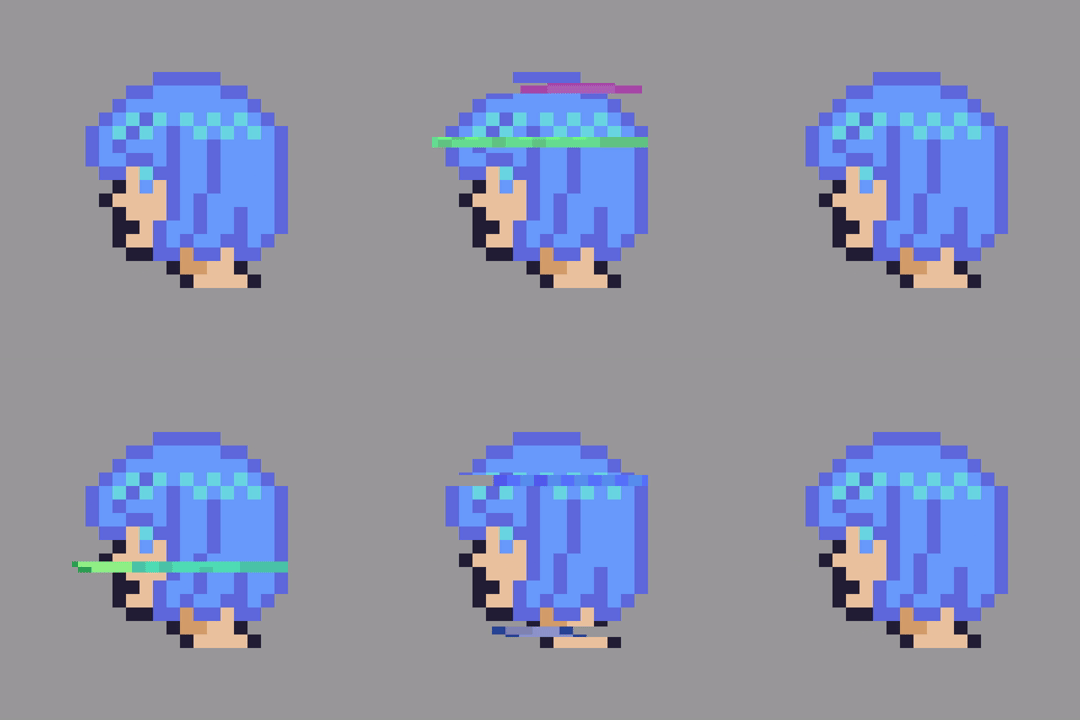
Thank you for reading this tutorial, I hope you found it useful!
Part 2 is available here.
 Agate DRAGON Games